Integrating your accounting system with a website, CRM and marketplaces: how the exchange works and why it breaks
How to connect the accounting system to a website, CRM and marketplaces: HTTP services, OData, exchange over a queue. Why spreadsheet exports collapse and how to build an exchange that survives the first change in the product catalogue.
Short answer: a reliable accounting integration is not an export button but a separate exchange layer with logging and alerts. It is built on HTTP services or OData on the accounting side, plus a queue or a file gateway for systems that cannot reach the accounting system directly. A pilot on one direction takes three to five weeks; a full two-way integration takes two to three months. The main reason an exchange “breaks” is not the accounting system but the fact that it was assembled from spreadsheet exports with no error handling.
Here is how it works and where it tears.
Why “integration” usually means spreadsheets
In a typical wholesale or manufacturing company the accounting system is the source of truth, and the link to the website, CRM and marketplaces works like this: once a day a manager exports a price list, someone uploads it to the website; orders from the website arrive by email and are re-entered by hand; marketplace stock is updated when somebody remembers.
This works right up to the first failure:
- the export format changed, and the parser on the website silently uploaded empty prices;
- the manager went on holiday, marketplace stock was not updated for three days, orders came in for goods that did not exist, and cancellation penalties followed;
- two systems diverged on the product catalogue, and now nobody knows which is right.
The root of the problem is not the accounting system and not incompetence. The root is that the exchange was assembled as a one-off export rather than as a system that survives errors. A proper integration differs in three ways: it has an API instead of files, it has a schedule, and it has monitoring that shouts when the exchange stalls.
How a proper exchange is built
On the accounting side there are three working mechanisms, and the choice depends on the version and the task:
- HTTP services — you define methods on the accounting side (get stock, create an order, issue a document) and call them over HTTP. The most flexible option: the system returns exactly what is needed, in the format needed.
- OData — most modern accounting editions can expose reference data and documents over a standard protocol out of the box. Quick to connect for reading, but for complex writes and business logic you come back to HTTP services anyway.
- Exchange over files or a queue — when a direct call is impossible, because of an old version or strict security requirements, the accounting system drops packets into intermediate storage and the external system collects them. A queue adds reliability: a message is not lost if the receiver is temporarily unavailable.
On the external side — website, CRM, marketplace connector — you put an integration layer, usually a separate service in Python that knows how to talk to the accounting system, how to retry failed operations and how to report failures. That layer, rather than the cleverness of the accounting system, determines the complexity and the cost of the project.
A practical principle: raw responses are stored as they arrived and the views are recomputed. When the accounting system corrects a document retroactively — and it does — the exchange survives that without manual intervention.
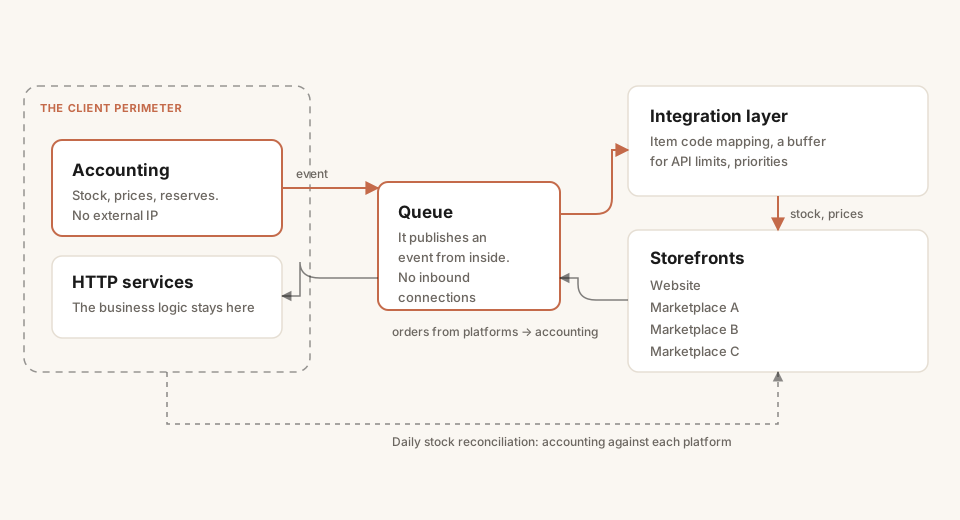
An event-driven exchange: the accounting system is never exposed, and everything goes through the queue. The daily reconciliation catches whatever was lost.
”But our accounting system sits inside, with no external IP”
This is the most common objection, and it is not a blocker. An on-premise system with no public address integrates like this:
- a VPN tunnel between your perimeter and the external system’s server — the accounting system stays closed and nothing is published;
- a message bus in a DMZ: the accounting system writes to the queue from inside, the external system reads from outside, and there is no direct access;
- a file gateway through an intermediate server — the simplest option for legacy configurations.
None of these requires exposing the accounting system to the internet. Security and integration do not conflict here.
Three places where the exchange tears most often
1. Website and accounting: stock and prices. The classic failure is a website showing a price and availability that no longer exist. The fix is synchronising stock in real time, or close to it, through an HTTP service rather than a daily export. An order from the website is then validated against current stock at checkout rather than against yesterday’s price list.
2. Marketplaces and accounting: orders and supply. Orders from the platforms should land in the accounting system automatically, and stock should go back out. The subtlety: item codes almost never match between the platforms and the accounting system, so the SKU mapping table becomes the critical reference. Without it any synchronisation turns into manual reconciliation. More on the economics of this in marketplace margin analytics.
3. CRM and accounting: customers and documents. Sales work in the CRM, bookkeeping in the accounting system, and the customer base diverges. A two-way exchange of customers, invoices, payments and statuses removes double entry. For common pairs there are off-the-shelf connectors; we take the work when the standard connector does not cover the specifics of the catalogue or the process.
How to tell the exchange is working
An integration without metrics is a hope, not a system. The minimum we attach to every exchange:
- logging of every operation — what went out and came back, when, and with what result;
- alerts on failures — if the exchange stalls or errors start, the team hears it from monitoring rather than from a customer;
- three numbers for the business: time from an event to the data landing in the accounting system (target: minutes instead of hours and days), the number of manual operations (target: zero), and the share of stock desynchronisation (target: zero).
It is the presence of logs and alerts that separates an integration you can hand to your in-house team for support from a black box nobody dares touch.
Cost and duration
- A simple exchange — one direction, regular synchronisation of products and stock — a pilot in three to five weeks.
- A full two-way integration of website, CRM or WMS — two to three months.
We always start with a pilot on one direction with parallel control: the old exchange still runs, the new one already moves data, and we reconcile the result before switching the manual exports off. That is more expensive than rewriting everything over a weekend, but it is how an integration reaches production without downtime.
In short
- An “integration” built on spreadsheet exports is not an integration, it is a deferred incident.
- A proper exchange is built on HTTP services or OData plus a queue or gateway for closed perimeters.
- An on-premise system with no external IP integrates through VPN, a bus or a file gateway — there is no need to expose it.
- The exchange tears at stock (website), item codes (marketplaces) and the customer base (CRM). Budget for those three with room to spare.
- Without logs and alerts the integration does not exist: it lasts exactly until the first silent failure.
More on the service in accounting system integration. Adjacent solutions: a marketplace aggregator and a messenger bot for B2B that posts orders straight into the accounting system.
Facing a similar problem?
Tell us what you are building. We will walk through the architecture and give you a budget range in one call.