Replacing SAP: a methodology for phased migration without stopping the business
How to replace SAP with a local system in stages while preserving the business processes. The pilot, data migration, the parallel track and decommissioning the old system.
Short answer: you leave SAP process by process, not by replacing the system in one go. The working scheme is a parallel track: the new module launches alongside the existing system, they live together for a while, and only after verification on real data does the process switch over completely. A pilot of a key process takes six to ten weeks; a full phased migration, six to twelve months.
People come to us with one of two opening lines:
“SAP has formally left, we cannot renew the licences, we needed a replacement yesterday.”
“We have been trying to replace SAP for three years and somehow it never happens.”
Both are about the same mistake: trying to replace the system wholesale in one pass. A project like that runs 18 to 36 months, costs a fortune, and in a majority of cases never reaches production operation.
The right approach is phased migration with a parallel track.
Step 1: take inventory of the functions
Before the first commit you need to understand what you actually use in SAP. Usually 30–40% of the functions are either unused or used two or three times a year and can be replaced by an export to a spreadsheet.
What happens at this step:
- Interviews with key users, thirty to sixty people depending on scale.
- An audit of SAP logs: which transactions were actually called in the last twelve months.
- A matrix of function, criticality, frequency of use and migration difficulty.
The output: a shortlist of five to ten functions for the pilot and a full register of functions for the later stages.
Step 2: pilot on a non-critical process
The pilot is NOT an MVP of the SAP replacement. The pilot is a proof of the architecture on the simplest process, where an error will not stop the business.
Typical pilot candidates:
- Warehouse management, if it is not tied to banking.
- Purchase request tracking, up to the document workflow stage.
- The product catalogue and reference data.
What the pilot must contain:
- A two-way exchange with the accounting system.
- A role model matching the one in SAP.
- An audit log of every operation.
- Deployed monitoring: latency, errors, data consistency.
Pilot duration: eight to twelve weeks. After the pilot comes the go or no-go for migrating critical processes.
Step 3: the parallel track
The most common mistake when migrating critical processes is a hard cutover. Monday: working in SAP. Tuesday: working in the new system. By Wednesday three reports do not reconcile and the whole team is back in SAP.
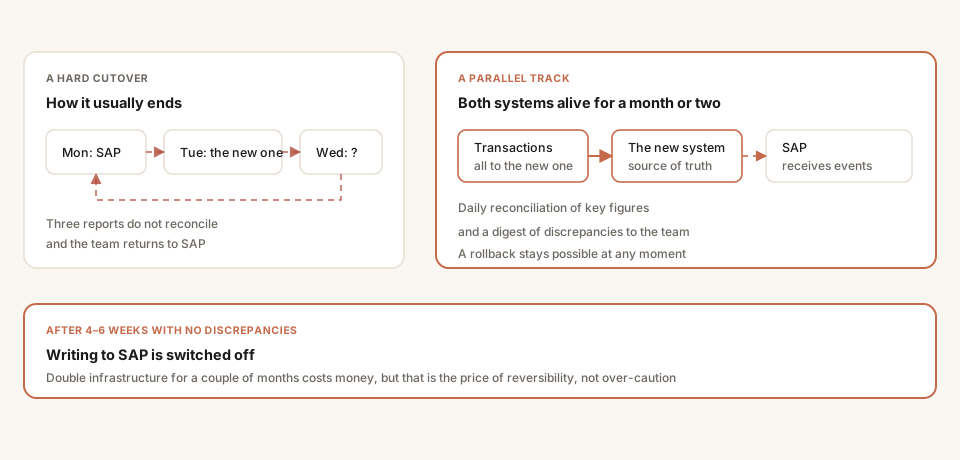
Double infrastructure for a couple of months is the price of reversibility. A hard cutover leaves no way back.
The right way: a month or two of both systems running in parallel. Data is written to both, reports are reconciled, discrepancies are investigated.
The parallel track is built like this:
- All transactions go to the new system.
- The new system asynchronously sends events to SAP, or the other way round depending on the direction of migration.
- Daily reconciliation of key figures.
- A daily digest of discrepancies by message or email.
After four to six weeks, when there are no discrepancies, writing to SAP is switched off.
Step 4: migrating historical data
A separate task often confused with migrating functions. Do not move the whole history into the new system — it bloats the database and slows operational transactions.
Our approach:
- Current data, the last two years — moved in full, it is needed for operational queries.
- Deeper history — moved into an archive environment, a separate database with its own interface.
- Legally significant documents — moved in full regardless of age.
For archive access we build a separate web interface with search. That is cheaper than optimising search in a live ERP database of thirty million rows and up.
Step 5: taking SAP out of the critical path
After three to six months of the new system running, SAP is switched off for operational tasks. What remains:
- Reference mode — read-only access for audit and incident investigation.
- Export of legally significant data, in case of inspections.
- Closing the licences — often after this step rather than before.
If the SAP licences are already physically gone, this step merges with the migration: the old system stays in a read-only container with expired licences, but the data remains accessible.
A special case: replacing the integration bus
The integration bus — SAP Process Orchestration, or the older Process Integration — is often forgotten in planning and remembered mid-project. And it usually turns out to be the node through which half the company’s exchanges run: banks, warehouse, marketplaces, production systems.
The peculiarity is that a bus has no business value of its own. It cannot be moved partially and it cannot be left running after the other modules have gone: its licences are counted separately and support ends with everything else.
The practical order of replacement is this.
First, an inventory of the exchanges, not development. You need a list of every interface: who sends, who receives, what format, what frequency, what happens on failure. As a rule it turns out a third of the interfaces are long dead, and several critical ones have neither documentation nor a living owner.
Then, choosing the target architecture. For most companies a bus at that level is excessive: its functions are covered by a message queue and a set of adapters. RabbitMQ or Kafka plus a mediator service give the same delivery and reprocessing guarantees at an incomparably lower cost of ownership. A full ESB is warranted where there really are hundreds of interfaces needing complex routing and transformation.
Then, moving interfaces in waves, on the same parallel-track principle described above: the new route runs alongside the old one, both work simultaneously for a while, discrepancies are reconciled, and only then is the old one switched off.
Most often the accounting exchange moves along with the bus — and that is a convenient moment to rebuild it properly, through HTTP services or a queue, rather than the scheduled file exchange inherited from before.
A special case: warehouse management and moving to a local WMS
The warehouse is the one area you cannot stop “over the weekend while we switch”. So replacing SAP EWM works differently from replacing a finance or procurement module, and it cannot be planned by the general methodology.
First thing to understand: EWM is replaced site by site, not function by function. In the other modules a wave is a process: procurement first, then warehouse, then finance. In WMS a wave is an entire physical site. You cannot run half a warehouse on the new system and half on the old: one bin topology, one stock figure, one task queue. So a network of five warehouses means five switchovers, each with its own stop, stocktake and change of process for the staff.
Second: the weight of the project is set by the automation, not by EWM. If the warehouse is manual or semi-manual — handheld terminals, labels, task-based picking — this is a WMS rollout of ordinary size. If the mechanics are driven through EWM — conveyors, automated storage, sorters, meaning material flow control is involved — this is an industrial automation project: the exchange with equipment controllers has to be described again and tested on a live line. The timelines and risks there are fundamentally different, and you need a contractor with experience of exactly that integration.
Third: what happens to the ERP. Usually SAP EWM is removed together with the ERP, but sometimes the reverse: the ERP stays and only the warehouse changes. Then the new WMS has to sit exactly where EWM sat in the exchanges: receipt against order, shipment confirmation, transfers, stocktake discrepancies. That is an important fork: while SAP remains the source of master data, the WMS attaches to it as an external system, and the interface must be designed before the product is chosen.
The order that works:
- Capture the current topology and strategies. Zones, bin types, putaway and picking rules, task priorities, the wave scheme. This is the most underestimated part: over the years EWM accumulates dozens of rules nobody remembers any more, and they run every day.
- Choose the target system for the type of warehouse, not by name. Custom WMS development from scratch is rarely justified — usually only where the process genuinely is unique rather than “we do everything our own way”.
- Pilot on one warehouse, and preferably not the largest. Three to six months, including training staff and bedding in the terminals.
- Switch over per site: stop, stocktake, load stock and topology into the new system, start. Stock is transferred as of the stop; movement history goes to an archive rather than into the new WMS, which does not need it, and migrating history lengthens the project for no benefit.
- Terminals, printing and connectivity are their own budget line. Replacing a WMS almost always drags along replacing or reflashing handheld terminals, new label templates and checking Wi-Fi coverage in areas where the old system worked for years.
Honest timelines: one warehouse is three to six months from start to stable operation; a network of warehouses is one to two years, because switchovers run sequentially with a stabilisation period between them.
Our experience here: we have no completed SAP EWM replacement, and we will not pass off somebody else’s as ours. Our write-up of how such a project is structured is the WMS case, and it is marked there as a project scenario rather than a delivered rollout.
Our strength in this area is the integration layer: the exchange between WMS, ERP and the accounting system, queues and adapters, reconciling discrepancies. If that is the problem, there is something to talk about; if you need a contractor with a dozen delivered warehouses, it is more honest to say so up front.
Oracle: three different projects hiding behind one word
“Replacing Oracle” sounds like one task and is in fact three projects of very different weight, and the first thing to establish is which one you mean. The confusion is the most expensive part: an estimate is given for one and the work turns out to be another.
1. Oracle Database to PostgreSQL. The most frequent case. Data moves relatively easily; the problem is that in Oracle the logic lives inside the database itself — PL/SQL packages, triggers, scheduler jobs. So “move the database” becomes “rewrite part of the application”.
What almost always gets rewritten by hand: hierarchical CONNECT BY queries, autonomous transactions, optimiser hints, sequence specifics — and the behaviour of the empty string: in Oracle '' is NULL, in PostgreSQL it is not, and that quietly changes comparison results. Automatic converters give you 60–80% of the code; the remainder is manual work, and it is what sets the timeline.
A project like this is estimated not by data volume but by an inventory of the PL/SQL: how many packages, how many lines, and how much of it is called even once a year.
2. Oracle E-Business Suite or Oracle ERP to a local platform or a custom system. This is no longer a database but business processes, and the project is structured exactly like leaving SAP: function inventory, pilot, parallel track, waves. Everything written above applies here in full.
3. Infrastructure — Exadata, Oracle Linux, backup tooling. Separate work, closer to systems administration than development. Often runs alongside the first item at its own pace.
A timeline benchmark for the first case: a mid-sized database with active server-side logic takes four to nine months with a parallel track and result reconciliation on real data. It is less where there is almost no PL/SQL and the database works as storage: then it is weeks.
What not to do: start with moving the data. Data moves last, and the first step is working out how much logic has to be rewritten — otherwise the project stalls halfway when it turns out half the reporting is assembled by a package nobody remembered.
The failures we keep seeing
- “We will do it all at once” — a 24-month pilot, then collapse. Split into stages of three to four months.
- “We will take a boxed ERP as it is” — no local product replaces SAP one to one. Customisation is mandatory, and its volume often equals custom development.
- “We will migrate without a parallel track” — a cutover without reconciliation almost always exposes five to fifteen mismatches the audit did not cover.
- “We will skip the history, the lawyers will sort it out” — move what is legally significant, or the first inspection becomes a catastrophe.
- “Pilot on the hardest process” — you will be stuck in the pilot for twelve months and will not have proved the architecture.
What to do now
If you have SAP in the critical path and no migration plan, start with an inventory of functions. The analysis takes two to three weeks, and afterwards it is clear what an off-the-shelf platform can close and what needs custom development.
If you want a worked example, see the case of replacing a foreign WMS. The order of stages is covered in migrating off SAP: timeline and stages, and what drives the duration in how long a SAP migration takes.
Facing a similar problem?
Tell us what you are building. We will walk through the architecture and give you a budget range in one call.