RAG on real corporate documents: why 70% of the work is parsing, not the model
In B2B RAG projects 60–70% of the budget goes into parsing and preparing documents, not into the neural network. The traps in real corporate PDFs — hybrid scans, tables, running headers, versions — and the fixes, with code.
Short answer: the money and the schedule in a RAG project go into preparing documents, not into the model — parsing PDFs and tables, stripping running headers, sorting out versions. In our experience that is 60–70% of the budget. The main source of wrong answers is garbage that made it into the index, and swapping in a more expensive model does not fix it.
When a client says “build us an assistant over our knowledge base”, the project in their head looks like this: take an LLM, feed it the documents, done. In our B2B work the picture is different. Everything around the model — retrieval, chunking and above all parsing the sources — eats 60–70% of the project. And the main source of bad answers is not a dumb model, it is what got indexed.
This article is the set of traps we walked into while processing real corporate corpora: thousands of PDFs with scans, tables, running headers and three versions of the same regulation. And what we settled on.
What “real documents” means
In demos, RAG runs on clean markdown files. In life a corpus looks like this:
- Three kinds of PDF: digital (a text layer exists), scans (no text layer), and hybrids (half the pages scanned, half digital). Hybrids are the worst: a naive pipeline processes half the document and silently loses the rest.
- Tables that turn into a soup of numbers without headers after naive extraction.
- Running headers and stamps (“Confidential”, page number, print date) that multiply into every chunk and pollute retrieval.
- Versions:
Regulation_final_v3_REVISED(2).pdfsitting next toRegulation_v1.pdf. With both in the index, the model will confidently quote the obsolete one. - Excel with merged cells, email threads, and slide decks where the meaning lives in the pictures.
Not one of these is solved by a smarter model. All of them are solved at ingest.
Trap 1: hybrid PDFs
The first instinct is to check whether a PDF has a text layer and send it to OCR if it does not. The problem: that check is usually run against the whole document, and hybrid PDFs pass it — the text layer “exists”, on some of the pages. The result is a document in the index with holes in it.
The fix is to decide per page:
import fitz  # PyMuPDF

def classify_pages(pdf_path: str) -> list[str]:
    doc = fitz.open(pdf_path)
    kinds = []
    for page in doc:
        text = page.get_text().strip()
        images = page.get_images()
        if len(text) > 50:
            kinds.append("digital")
        elif images:
            kinds.append("scan")     # → send to OCR
        else:
            kinds.append("empty")
    return kinds
The 50-character threshold is empirical: scanned pages often carry a “text layer” consisting of a single printer artefact. Pages marked scan go to OCR (we use PaddleOCR plus post-processing for Cyrillic), the rest are parsed directly. Store the extraction method in the chunk metadata — when you are debugging answers it saves hours, because you can see immediately that a hallucination grew out of a badly recognised scan.
Trap 2: tables
page.get_text() turns a table into a stream of words where “Rate, % — 12.5” gets separated from the row “Equipment loan”. The model’s answer about the rate becomes a lottery.
What worked for us:
- Detect tables in a separate pass (camelot or pdfplumber for digital PDFs, table-transformer for scans).
- Serialise the table into text as “header: value” pairs, not as a markdown table:
Product: Equipment loan. Rate: 12.5%. Term: up to 60 months. Collateral: pledge.
Product: Leasing. Rate: 14%. Term: up to 48 months. Collateral: leased asset.
The counter-intuitive part: markdown tables look good in a prompt but retrieve badly. The embedding of the row | 12.5 | 60 | pledge | carries almost no semantics. Key-value pairs give you both usable embeddings and context the model can read. Each table row becomes its own chunk, carrying the parent document metadata and the table caption.
Trap 3: running headers
In a corpus of 8,000 pages, the header “Acme Ltd. Confidential. Page N” appears 8,000 times. Search for anything containing the word “confidentiality” and the top results fill up with chunks that are relevant only because of the header.
Detection is simple: group lines by normalised text (digits → #), and whatever repeats on more than K% of a document’s pages at the same vertical position is boilerplate. Remove it before chunking:
from collections import Counter
import re

def find_boilerplate(pages_lines: list[list[str]], threshold: float = 0.6) -> set[str]:
    normalized = Counter()
    for lines in pages_lines:
        for line in set(lines):
            normalized[re.sub(r"\d+", "#", line.strip())] += 1
    n_pages = len(pages_lines)
    return {line for line, cnt in normalized.items() if cnt / n_pages >= threshold}
Trap 4: document versions
The most treacherous one, because technically everything “works” — the assistant simply quotes a regulation from two years ago, and you find out during acceptance testing.
There is no universal fix, there is a process:
- At ingest, compute a content signature (shingles) and find clusters of near-duplicates.
- Inside a cluster, pick the current version from metadata (modification date, file name, an explicit marking from the corpus owner) — and have a human on the client side confirm that choice, not an algorithm.
- Do not delete the old versions, mark them
superseded_by. Sometimes the question is “what changed compared with the previous edition”, and then you need the old one.
Which gives a practical rule for estimating these projects: if the client has no knowledge base owner who can say what is current, that is risk number one, and it has to surface during discovery rather than at acceptance.
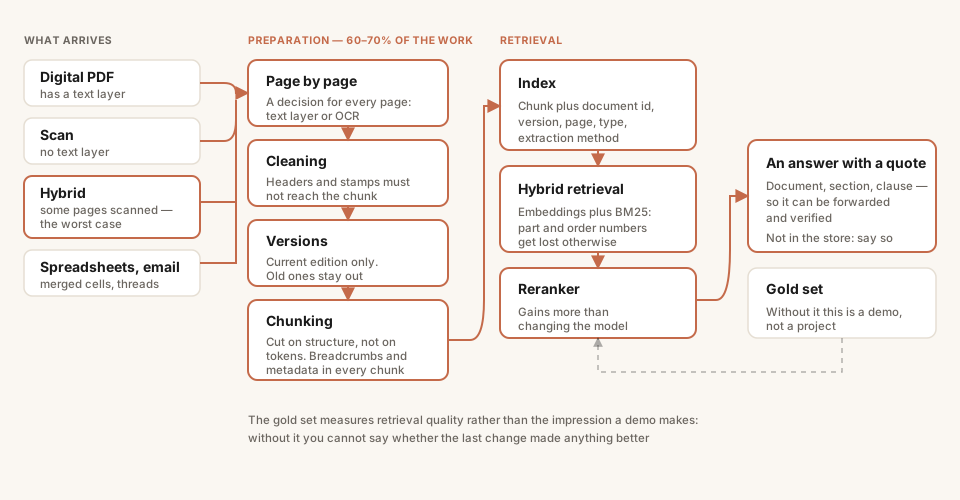
Most of the work sits in the left and middle of this diagram. The model stands at the very end and affects answer quality least.
Chunking: structure beats length
The classic advice to “cut into 512 tokens with overlap” performs poorly on corporate documents. Regulations and contracts have a rigid structure — sections, clauses, sub-clauses — and the boundaries of meaning follow it, not a token counter.
Our approach:
- Cut on structural boundaries (headings, clause numbering) and use the token limit only as an upper bound for clauses that are too long.
- Add context breadcrumbs to every chunk:
Document → Section 4 "Refund procedure" → clause 4.2. That line costs almost nothing in tokens and sharply improves both retrieval and the model’s ability to cite the source correctly. - Keep in the chunk metadata: document id, version, page, extraction method (digital/OCR), type (text or table row).
Retrieval: dense embeddings are not enough
In corporate queries people search for part numbers, order numbers and internal system acronyms. Dense embeddings miss on those — “order 417-OD” and “order 418-OD” are nearly indistinguishable in vector space.
The working setup is a hybrid: dense (embeddings) plus sparse (BM25) with fusion, and a cross-encoder reranker over the top 30. Qdrant does this natively, without a second search system. On our corpora the quality gain from the reranker is consistently larger than from moving to a “smarter” LLM.
Evaluation: without it this is a demo, not a project
Only what you can measure reaches production. The minimum we set up on every project:
- A gold set of 50–100 real questions from the future users, not invented by an analyst, with reference answers and source links.
- Automatic retrieval metrics (hit rate, MRR over sources), computed on every commit to the pipeline.
- LLM-as-judge for answer completeness and accuracy, plus mandatory spot checks by a human: the judge model systematically forgives confident hallucinations.
The gold set is what lets you answer the client’s question “did it get better?” with numbers instead of impressions. It is also disciplining: every parsing “improvement” is run against the metrics first.
The checklist
If we compress the experience:
- Classify PDFs page by page, not document by document.
- Tables get their own pipeline, key-value serialisation, one row per chunk.
- Strip boilerplate before chunking or it will eat your retrieval.
- Versioning is a process with a human in it, not a heuristic.
- Chunk on document structure and put context breadcrumbs in every chunk.
- Hybrid retrieval and a reranker before you think about changing the model.
- Build the gold set in week one.
None of this looks like “AI” on a slide. But it is exactly what separates a RAG system that answers correctly and cites the current clause from a demo that works beautifully on three prepared files.
We build RAG systems and AI assistants on corporate data, including deployments that never send data outside your perimeter. If you are scoping a project like this, the pieces on what a RAG project costs and RAG versus fine-tuning are the companions to this one. Tell us about your corpus and we will give you an honest read on it.
Facing a similar problem?
Tell us what you are building. We will walk through the architecture and give you a budget range in one call.